
Sending a lead to an OEM as an affiliate or publisher
This guide is for affiliate partners and publishers who send leads to a vehicle brand (OEM) that uses Driftrock. It explains the two ways to send leads, what you need from the brand before you start, how Driftrock responds to each lead and how to fix common errors.
How leads reach the brand
The brand receives your leads into a Capture in their Driftrock account. A Capture is the brand's connection to a lead source; in this case, to you.
There are two ways to send leads:
Through the API. Your system sends each lead to Driftrock's Affiliate Event API, a direct, server-to-server connection. This works whether or not you use Driftrock yourself.
From your own Driftrock account. If you also use Driftrock, you can send leads from your account to the brand's account using a Send to Driftrock automation. You do not need to build an API integration.
In both cases, Driftrock checks every lead against the brand's requirements before accepting it.
What the brand checks
When your lead arrives, Driftrock checks that:
all of the brand's required fields are present
values such as vehicle model match the brand's own list of accepted values
the lead meets the brand's Acceptance Rules, for example a valid phone number or a postcode within their target area
the lead is not a duplicate of one already received within the brand's chosen lookback period
Leads that pass are accepted and sent on to the brand's systems. Leads that fail are rejected, with the reason recorded. The brand can share a documentation page listing the exact criteria your leads must meet.
Option 1: Sending leads through the API
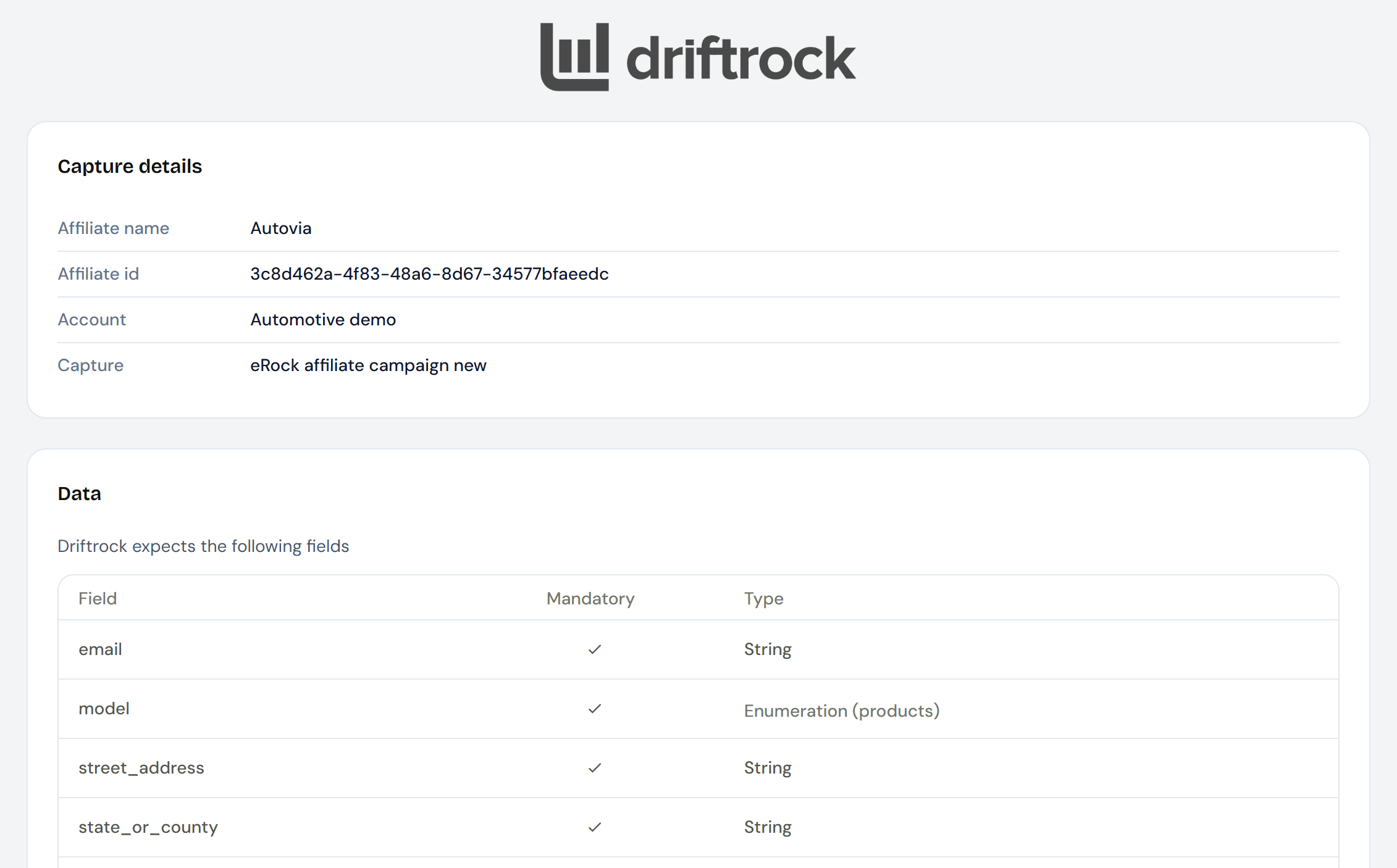
What you need from the brand:
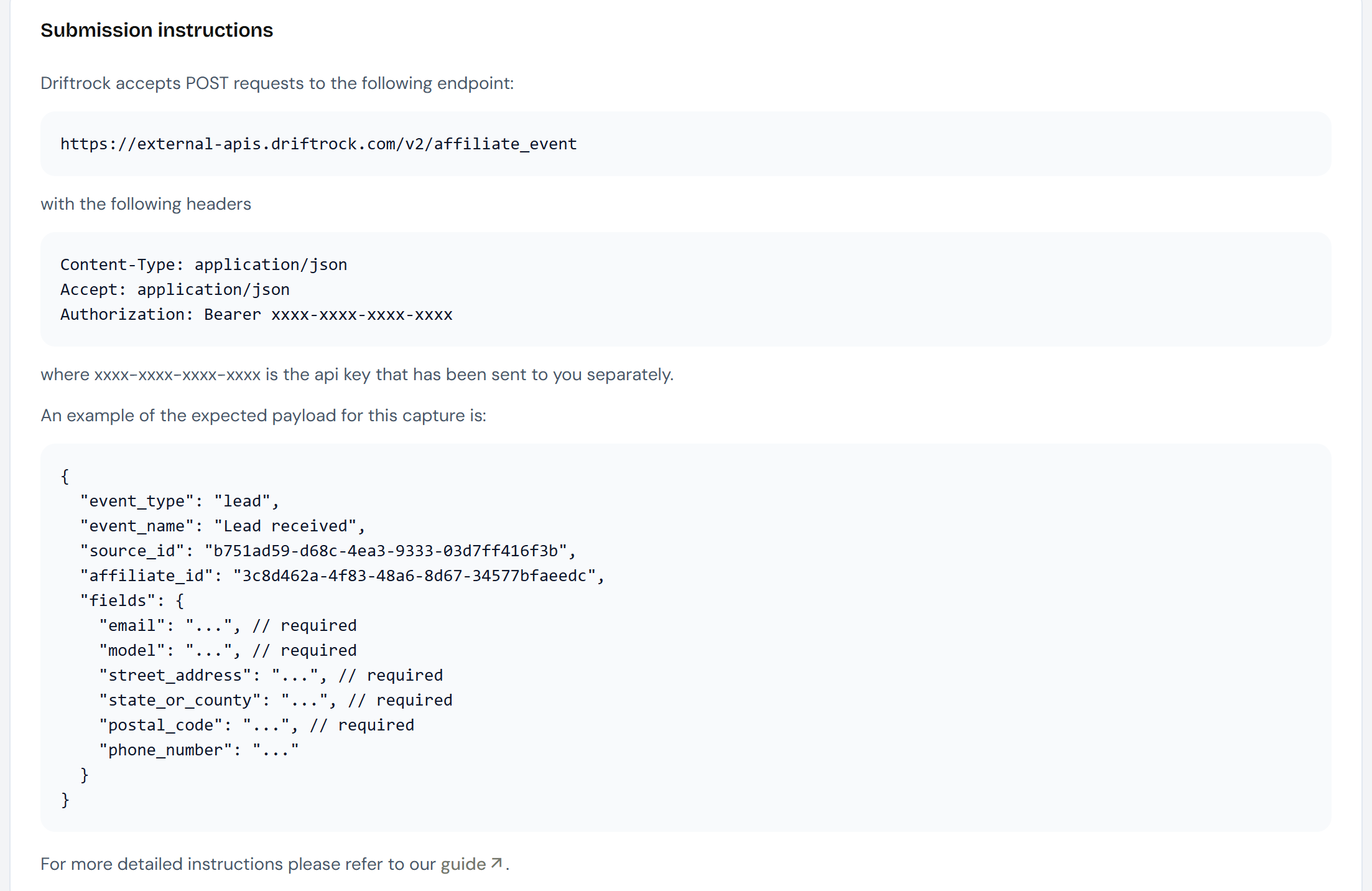
API endpoint URL: the address you send leads to.
API key: a code unique to you, which authenticates your requests. Keep it secure, as you would a password.
Affiliate ID: a unique identifier for you in the brand's Capture.
Example payload: a sample request showing the field names and formats the brand expects.
Acceptance criteria: the rules your leads must meet.
These instructions will be provided to you by the brand, and will typically look like the below:
How to send a lead:
Send each lead as a POST request to the API endpoint URL, with:
your API key in the request header
a JSON body containing the
source_id, youraffiliate_idand the lead's details in the fields the brand has defined, following the example payload
Send each lead as soon as it is submitted, so the brand receives it in real time.
What Driftrock sends back:
Driftrock responds to every request straight away to confirm whether the lead was accepted.
If a required field is missing, or a value is not one the brand accepts, Driftrock returns a 422 response code with an error message describing the problem. For example, if the brand matches leads to their vehicle list and you send a model name that is not on it, the error names the value and the field it was rejected for:
"error": "'XC12 Mild Hybrid' is not a valid value for field vehicle_id"
Use the message to correct the data and resend the lead.
Option 2: Sending leads from your own Driftrock account
If you use Driftrock, the brand can give your account access to their Capture. You then map your lead fields to the brand's fields and send leads automatically.
What you need from the brand:
Access to their Capture, granted from their Driftrock account.
Their acceptance criteria.
Steps:
Ask the brand to share access to their Capture with your Driftrock account.
In your account, set up a Send to Driftrock automation on the Capture that collects the leads you want to send.
Enter your Affiliate ID, API Key, and Source ID. Alternatively, you can map to the captures specific fields by selecting it from a dropdown, using the Send to Driftrock Affiliate (field mapping) option.
Activate the automation.
Leads you send after this arrive in the brand's account already mapped to their fields.
Testing your connection
Send one live test lead.
Ask the brand to confirm it arrived with the correct details.
If you are sending through the API, check the response. A 422 response includes the reason the lead was not accepted.
Tips
Use the field names and formats in the example payload exactly as given.
Use the brand's vehicle model names. If your model names differ from theirs, ask the brand which values to use.
Always include every field the brand has marked as required. Leads missing a required field are rejected.
Check the brand's acceptance criteria before your campaign starts, so you know which leads will be accepted.
Do not send the same person to the same brand more than once within their deduplication period, as repeat submissions are rejected.
Keep your API key private and do not share it with anyone outside your organisation. If you think it has been exposed, tell the brand so they can replace it.
If you send leads from your own Driftrock account and the brand changes their fields, fetch their fields again and update your mapping.
If a brand's Capture does not appear in your list, check with the brand that they have shared access with your account.